 English
 Spanish
 French
 German
 Italian
 Chinese (Simplified)
 Japanese
 Korean
 Arabic
 Portuguese
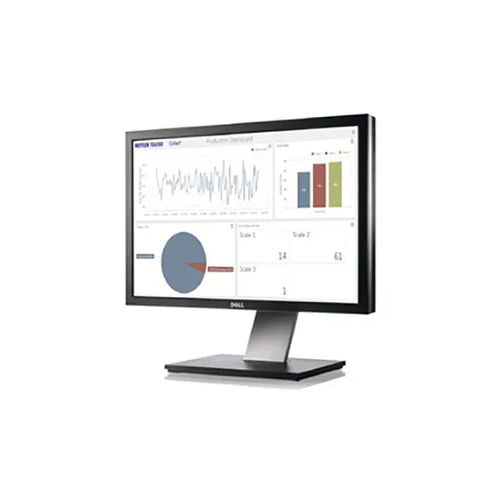
Data Collection Software
Product Details:
- Interface Type User-friendly GUI
- Security Features User authentication, access control, data encryption
- Support System Windows and Linux compatibility
- Language Support English, Multi-language interface
- Usage Commercial, Industrial, and Research Data Collection
- Capacity (Person) Multi-user
- Compatible System PC, Server
- Click to View more
X
Data Collection Software Product Specifications
- PC, Server
- Multi-user
- Data Collection / Data Acquisition
- English, Multi-language interface
- Commercial, Industrial, and Research Data Collection
- Software Application
- User-friendly GUI
- Windows and Linux compatibility
- User authentication, access control, data encryption
- On-premise & Cloud-based
- Automatic & Manual
- Auto-backup, Restore options
- Supported SDK / API integration
- CSV, Excel, XML, JSON
- Charts, Graphs, Reports
- 24/7 Online Support, Documentation, Training
- LAN, WAN, Internet enabled
- Single User / Multi User
- 2GB RAM, 20GB HDD, Intel Dual Core processor or higher
Product Description
Data Collection Software
Link Your Scales to Your Business
Collect+ data collection and visualization software brings a new perspective to your production. Process trends and key performance indicators are represented graphically, enabling you to make informed business decisions. Transparent views into your operation are critical to maintaining high quality and profitability.
Seamless Deployment and Integration
The software accommodates both on-premise and cloud-based deployment, offering flexibility for various organizational needs. Integration is streamlined with comprehensive SDK and API support, enabling smooth data flow between your existing systems. Whether operating over LAN, WAN, or the Internet, connectivity is robust, ensuring reliable data acquisition and management. Our platform is well-suited for PC and server environments, meeting the demands of businesses of any scale.
Comprehensive Data Management and Security
Data integrity and privacy are prioritized through powerful security features, including user authentication, access controls, and data encryption. Auto-backup and restore options protect critical information, while multi-format exports let you easily analyze data in Excel, CSV, XML, or JSON. This ensures efficient, secure handling of valuable organizational assets for informed decision-making.
User-Friendly Interface with Advanced Visualization
Navigate complex datasets with an intuitive GUI designed for usability. Our application provides robust visualization capabilities, enabling users to generate customizable charts, graphs, and reports. Additionally, multi-language interface support breaks down barriers for diverse teams, ensuring effective communication and insights across commercial, industrial, and research applications.
FAQs of Data Collection Software:
Q: How do I deploy the Data Collection Software for my organization?
A: The software can be deployed as either an on-premise or cloud-based solution, depending on your organizational needs. Installation is supported on both Windows and Linux platforms, making it suitable for PCs and servers. Detailed documentation and training are available to guide you through the deployment process.Q: What data formats can I export with this software?
A: You can export collected and processed data in a variety of industry-standard formats, including CSV, Excel, XML, and JSON. This flexibility facilitates easy integration with external analytics tools and ensures you can share data seamlessly across your organization.Q: When are software updates provided and how can they be applied?
A: The software supports both automatic and manual update methods. Automatic updates can be scheduled to ensure you always have the latest features and security patches, while manual updates are also available for organizations that prefer more control over update timing.Q: Where can I get technical support if I face issues?
A: 24/7 online technical support is provided for all users. Assistance can be accessed via dedicated support channels, and your license includes comprehensive documentation and optional training to address any challenges promptly.Q: What security measures are in place to protect my data?
A: Robust security features are built into the software, including user authentication, role-based access control, and data encryption. These measures help safeguard your sensitive information from unauthorized access and cyber threats.Q: How does the backup and restore process work?
A: The software includes auto-backup features for continuous data protection. In the event of data loss or corruption, the restore option enables you to recover your information quickly, minimizing downtime and ensuring business continuity.Q: What are the benefits of using this software for data collection and visualization?
A: By centralizing data acquisition, visualization, and export, the software streamlines workflow, enhances data accuracy, and supports informed decision-making. Advanced visualization through charts and reports, combined with strong integration and security, brings efficiency and reliability to commercial, industrial, and research data management.Tell us about your requirement

Price:
Quantity
Select Unit
- 50
- 100
- 200
- 250
- 500
- 1000+
Additional detail
Mobile number
Email

Other Products in 'Software Products' category

Contact Details
Mettler-Toledo India Private Limited
GST : 27AABCM0779N1Z0
GST : 27AABCM0779N1Z0

- Amar Hill, Saki Vihar Road, Powai,Mumbai - 400072, Maharashtra, India
- Phone : 08045816537
- Ms Ekta Zemse (Executive Marketing)
- Mobile : 08045816537
-
 Send Inquiry
 Send Inquiry
|


 |
Mettler-Toledo India Private Limited
All Rights Reserved.(Terms of Use) Developed and Managed by Infocom Network Private Limited. |
