 English
 Spanish
 French
 German
 Italian
 Chinese (Simplified)
 Japanese
 Korean
 Arabic
 Portuguese
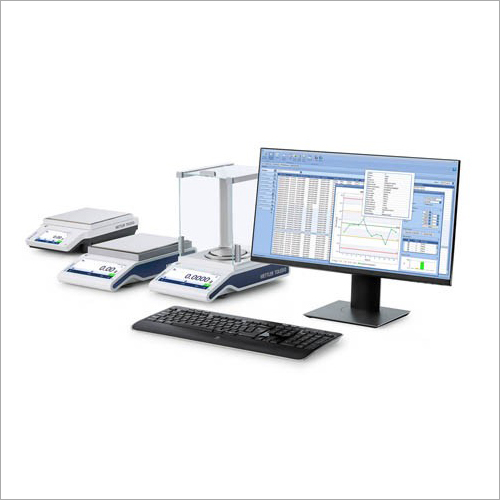
EasyDirect Software
Product Details:
- Support System Software Support and Online Updates
- Security Features Password Protection and Access Rights
- Capacity (Person) Multi-user Access
- Language Support English, Multiple Languages
- Compatible System Windows 7, Windows 8, Windows 10, Windows 11
- Usage For Analytical and Laboratory Instruments
- Interface Type USB, Ethernet, Wireless
- Click to View more
X
EasyDirect Software Product Specifications
- Data Recording and Management
- Windows 7, Windows 8, Windows 10, Windows 11
- Data Management Software
- Software Support and Online Updates
- Password Protection and Access Rights
- Multi-user Access
- English, Multiple Languages
- For Analytical and Laboratory Instruments
- USB, Ethernet, Wireless
- Cloud and Local Backup Supported
- PDF, XLS, CSV
- 0°C to 40°C
- Automatic and Manual
- Single or Multi-User License Options
- Real-Time Sync Across Devices
- LAN, WLAN
- Balances, Meters, Analytical Instruments
- PC Installation
- Graphical User Interface (GUI)
EasyDirect Software Trade Information
- Western Europe, Central America, Eastern Europe, Middle East, South America, Asia, North America, Australia, Africa
- All India
Product Description
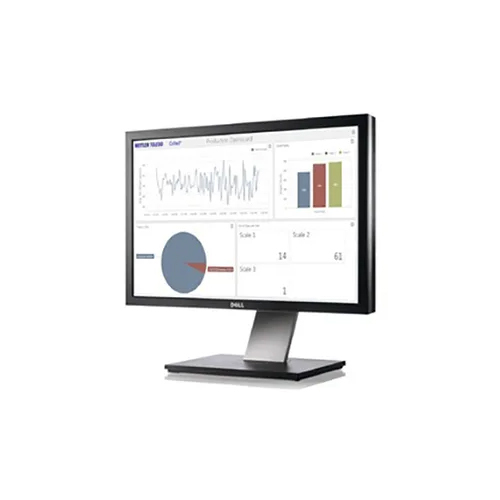
Simple Data Management :
- Collect weighing data from up to 10 balances via Ethernet or RS232
- Minimize manual transcription errors, save time and store data securely
- Easily review results, generate simple and clear reports, and export manually or automatically data in various formats (XML, CSV, XLSX or PDF)
Optimized for Laboratory Applications
EasyDirect Software is engineered specifically for analytical and laboratory workflows. With multi-device compatibility and real-time data sync, it ensures precise data recording and efficient management, enhancing productivity for research teams and organizations.
Flexible Installation and Updates
The software installs easily on PCs and is compatible with major Windows operating systems. Users can select between automatic or manual updates, guaranteeing the system remains current with minimal interruption to laboratory operations.
Comprehensive Security & Backup
Advanced security safeguards, including password protection and customizable user access rights, protect sensitive information. Data integrity is maintained through robust backup options, with both cloud and local storage solutions ensuring business continuity.
FAQ's of EasyDirect Software:
Q: How does EasyDirect Software facilitate real-time data synchronization across multiple devices?
A: EasyDirect Software uses advanced network connectivity options like LAN and WLAN to synchronize data instantly between compatible balances, meters, and analytical instruments, ensuring that every authorized user sees the most current results in real time.Q: What formats can I export data to using EasyDirect Software?
A: You can export laboratory data directly to PDF, XLS, or CSV formats, making it simple to share, analyze, or archive information according to your workflow requirements.Q: When should I perform a manual software update instead of relying on automatic updates?
A: Manual updates are recommended if you need to review update details before installation or if your network requires administrator approval. Otherwise, automatic updates keep your software up-to-date with minimal effort.Q: Where can EasyDirect Software be installed and operated?
A: EasyDirect Software installs on PC systems running Windows 7, 8, 10, or 11, and is designed for use in laboratory and analytical environments throughout India, suitable for organizations ranging from research centers to educational institutions.Q: What is the process for backing up data with EasyDirect Software?
A: You can configure EasyDirect to perform regular backups either locally on your computer/network or to cloud storage. This ensures critical laboratory data remains secure and easily recoverable in case of system failure.Q: How does the user interface benefit laboratory users?
A: EasyDirect features a graphical user interface (GUI) designed for simplicity and clarity, providing intuitive navigation and efficient access to data management tools, which helps users reduce errors and improve workflow productivity.Tell us about your requirement

Price:
Quantity
Select Unit
- 50
- 100
- 200
- 250
- 500
- 1000+
Additional detail
Mobile number
Email

Other Products in 'Software Products' category

Contact Details
Mettler-Toledo India Private Limited
GST : 27AABCM0779N1Z0
GST : 27AABCM0779N1Z0

- Amar Hill, Saki Vihar Road, Powai,Mumbai - 400072, Maharashtra, India
- Phone : 08045816537
- Ms Ekta Zemse (Executive Marketing)
- Mobile : 08045816537
-
 Send Inquiry
 Send Inquiry
|


 |
Mettler-Toledo India Private Limited
All Rights Reserved.(Terms of Use) Developed and Managed by Infocom Network Private Limited. |
