 English
 Spanish
 French
 German
 Italian
 Chinese (Simplified)
 Japanese
 Korean
 Arabic
 Portuguese
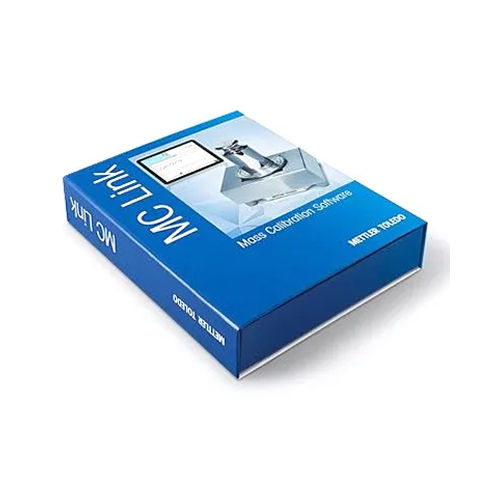
MC Link Software
Product Details:
- Support System Windows
- Security Features Advanced Security Encryption
- Usage Office/Industrial
- Compatible System Biometric Devices
- Language Support Multi-Language
- Interface Type USB/RS232/RS485
- Capacity (Person) 1000
- Click to View more
MC Link Software Product Specifications
- Advanced Security Encryption
- Office/Industrial
- Biometric Devices
- Windows
- USB/RS232/RS485
- Time Attendance Software
- Attendance Management
- 1000
- Multi-Language
- Single/Multiple User
- Database (SQL/MS Access)
- Multi-User Access
- Standard PC Operated
- Excel/CSV/PDF
- Customizable
- Fingerprint/RFID/Face Devices
- Online/Telephonic
- Payroll and HRMS
- Automated/Manual
- Online/Offline
- CD/DVD/Download Link
- Latest Release
MC Link Software Trade Information
- Western Europe, Central America, North America, Eastern Europe, Middle East, South America, Asia, Australia, Africa
- All India
Product Description
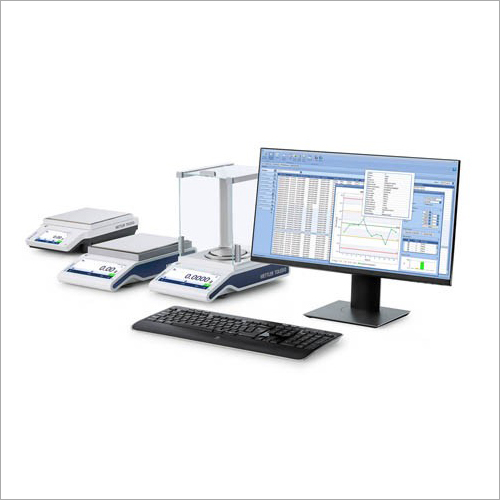
Overall, MC Link software is a powerful tool for managing and controlling multiple balances in laboratory and industrial settings, reducing the risk of errors and improving the accuracy and efficiency of weighing processes.
FAQ
1. What is MC Link Software, exactly?
Ans - An effective data integration solution, MC Link Software enables users to rapidly and simply integrate various data sources, making data extraction, transformation, and loading simple.
2. What other kinds of data sources can be linked using the MC Link Software?
Ans - The MC Link Software can link to a wide range of data sources, including databases, APIs, and flat files.
3. How safe is MC Link Software, third?
Ans - The MC Link Software was created with security in mind, to be sure. To safeguard data and provide secure connection between various systems, it makes use of secure authentication and encryption.
4. What kind of assistance is offered for MC Link Software?
Ans - MC Link Software provides thorough support options, such as online guides, tutorials, and customer service.
5. How user-friendly is MC Link Software?
Ans - Yes, MC Link Software is made to be simple to use and understand. It offers a graphical user interface, allowing for quick and simple data integration tasks to be created with little to no scripting.
Efficient Attendance Management
MC Link Software automates time tracking and attendance management for businesses, enhancing accuracy and reducing manual workload. Its compatibility with biometric devices ensures reliable user identification and swift data entry. Comprehensive user management enables multi-user access, making it suitable for organizations with diverse staff structures.
Powerful Data Handling & Security
With robust SQL/MS Access database support and advanced security encryption, MC Link safeguards sensitive attendance data. Users can perform data backups both manually and automatically, ensuring information is always protected and recoverable. Integration with payroll and HRMS systems optimizes data utilization across various business applications.
Flexible Implementation & Support
MC Link is easy to install via CD/DVD or direct download and operates efficiently on standard PCs with USB, RS232, or RS485 interfaces. The software comes with online and telephonic support, providing prompt assistance for troubleshooting and maintenance. Whether used by dealers, exporters, manufacturers, or service providers, MC Link adapts to business needs.
FAQ's of MC Link Software:
Q: How can MC Link Software be installed and set up in my organization?
A: Installation is straightforward-simply use the provided CD/DVD or download link to install on any Windows-based PC. The software guides you through setup, and online/telephonic support is available for assistance during the process.Q: What types of biometric devices are compatible with MC Link Software?
A: MC Link supports fingerprint, RFID, and face recognition biometric devices. It connects seamlessly via USB, RS232, or RS485 interfaces, making it suitable for various attendance applications.Q: When should I perform data backup, and how does it work in MC Link Software?
A: Automated backups can be scheduled as per your organization's needs, while manual backups are available anytime through the software's interface. This dual backup approach secures your attendance records against accidental loss.Q: Where can the generated attendance reports be exported, and in which formats?
A: Customizable reports from MC Link Software can be exported directly to Excel, CSV, or PDF formats, allowing flexibility for data analysis, sharing, or integration with other systems.Q: What process does MC Link Software follow for integrating with Payroll and HRMS systems?
A: MC Link provides built-in integration support, facilitating seamless transfer of attendance data to your Payroll and HRMS application. This ensures accurate payroll processing and efficient HR operations.Q: How does multi-user access benefit my organization's attendance management?
A: Multi-user access enables authorized personnel to simultaneously manage attendance data, generate reports, and perform administrative tasks. This streamlines operations and improves workflow efficiency, especially in larger organizations.Q: What advanced security features does MC Link Software offer to safeguard my data?
A: The software uses state-of-the-art encryption mechanisms to protect sensitive attendance data, ensuring confidentiality and compliance with organizational security standards.
Price:
- 50
- 100
- 200
- 250
- 500
- 1000+

Other Products in 'Software Products' category

GST : 27AABCM0779N1Z0

- Amar Hill, Saki Vihar Road, Powai,Mumbai - 400072, Maharashtra, India
- Phone : 08045816537
- Ms Ekta Zemse (Executive Marketing)
- Mobile : 08045816537
-
 Send Inquiry
 Send Inquiry
|


 |
Mettler-Toledo India Private Limited
All Rights Reserved.(Terms of Use) Developed and Managed by Infocom Network Private Limited. |
